Boards › 🎬 Storyboards › Screen Demo

The screen demo storyboard.

For SaaS, templates, digital tools — anything that lives on a screen. Three ways to make software look like magic — fill in {your tool}, copy the shots.

One scene ≈ 3 seconds. 15s = 5 shots · 30s = each beat splits into 2 shots. Every prompt has a {fill-in} slot — replace it with your own thing.

Pick by video type:
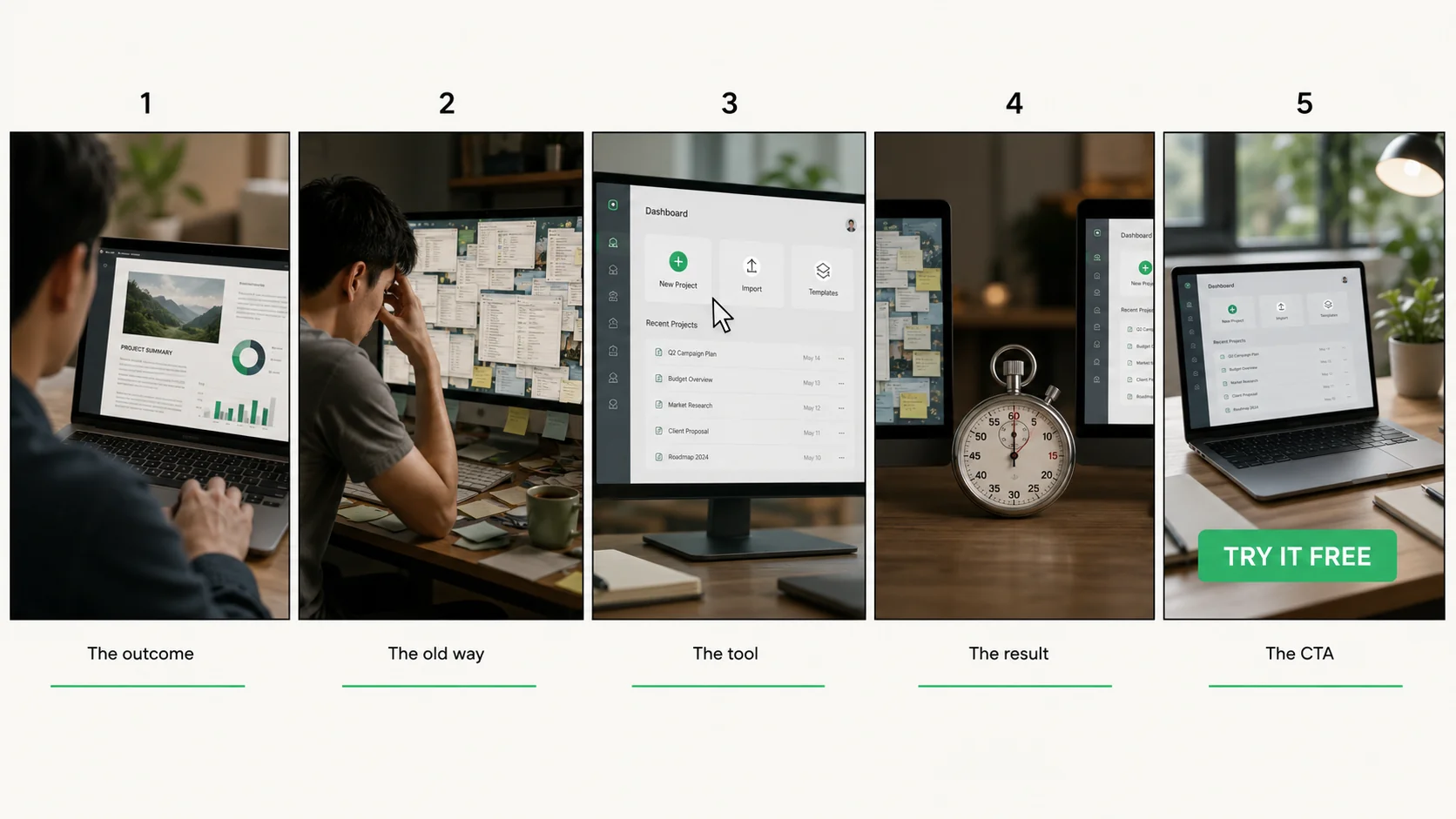
Screen Demo example storyboard sheet — 5 sketched panels
Example sheet: the 15s cut of this board, panel by panel.

⚖️Old Way vs My Way Comparison Demo

The contrast cut — slow manual pain vs your tool. The default play for any productivity product.

11
Outcome hook~3s

Lead with the end result — what they get, in one line.

Bold text hook over the finished output of {your tool}: the result first
2
The claim~3s · 30s cut

The time or money number behind the hook.

Text-on-screen: the exact time {your tool} saves, plain background
23
The slow old way~3s

Manual steps, sped up to feel painful.

Sped-up screen recording of the manual way to {the task}, cluttered tabs, sighs
4
The error~3s · 30s cut

The old way breaking — a typo, a crash, a redo.

The manual process failing at the worst moment, freeze frame
35
The tool in action~3s

Your product doing the same job — real UI, real speed.

Clean screen recording of {your tool} completing the same task, cursor deliberate
6
The one-click beat~3s · 30s cut

THE click — the single action that does it all.

Macro-feel zoom on the one click in {your tool} that triggers the magic
47
The result~3s

Output on screen + time elapsed comparison.

Finished result from {your tool} beside a time comparison: old way vs now
8
The export~3s · 30s cut

Result flowing into where they actually use it.

The output of {your tool} being exported into a real workflow
59
CTA~3s

Where to try it — free tier or link.

End card for {your tool}: logo, one-line promise, 'Try it free' CTA
10
Social proof beat~3s · 30s cut

User count or rating ticks up.

End card with live-feeling user counter ticking upward

Speedrun the Result Speedrun

One continuous run, no talking — the tool speaks. Best when your UI is genuinely fast.

11
The timer starts~3s

A stopwatch starts on screen — a promise with a deadline.

On-screen stopwatch starting at zero beside a blank {your tool} workspace
2
The blank page~3s · 30s cut

Empty state — everyone knows this fear.

Slow push-in on the empty new-project screen of {your tool}
23
Setup in seconds~3s

Template picked, settings chosen — no dead frames.

Rapid cuts of {your tool} setup: template chosen, options set, rhythm editing
4
The shortcut~3s · 30s cut

One power-user shortcut flexed silently.

Keyboard shortcut overlay firing inside {your tool}, snappy cut
35
The build~3s

The core work happening at real (fast) speed.

Continuous screen capture of {your tool} building the output, cursor confident
6
The detail pass~3s · 30s cut

One zoom-in on quality mid-run.

Zoom on a detail {your tool} gets right automatically
47
Timer stops~3s

The stopwatch freezes — under the promised time.

Stopwatch freezing on the final time, result full-screen behind
8
The double-take~3s · 30s cut

Replay the last second in slow-mo.

Slow-motion replay of the final click and timer stop
59
Result + CTA~3s

Finished output + 'your turn' CTA.

Final output from {your tool} with 'Your turn — link in bio' CTA
10
The loop~3s · 30s cut

Cut back to the blank page — loop restart.

Hard cut back to the blank workspace, loop-ready

🧑‍🏫Zero to Done Tutorial

The teach-along — a mini tutorial that sells. Best for templates and tools with a learning curve.

11
The promise~3s

'By the end of this video you'll have X' — a contract.

Direct-to-camera promise: what they'll finish with using {your tool}, upbeat
2
The proof flash~3s · 30s cut

Half a second of the finished thing.

One-beat flash-forward of the finished {your tool} result
23
Step one~3s

The first move, narrated simply.

Screen recording step 1 in {your tool}, big cursor, caption 'Step 1'
4
The why~3s · 30s cut

One line on why this step matters.

Zoomed annotation explaining why step 1 of {your tool} matters
35
Step two~3s

The middle move — where most people get stuck.

Screen recording step 2 in {your tool}, caption 'Step 2', steady pace
6
The mistake to avoid~3s · 30s cut

The common error, crossed out.

The common step-2 mistake shown then crossed out with a red X
47
Step three + done~3s

Final move, output appears.

Screen recording step 3 in {your tool}, result rendering, caption 'Done'
8
The polish~3s · 30s cut

One optional pro touch.

A quick pro-level tweak in {your tool}, 'optional but nice' caption
59
Recap + CTA~3s

3 steps on one card + where to get the tool/template.

Recap card: 3 steps to done with {your tool}, 'Get it — link in bio' CTA
10
Save prompt~3s · 30s cut

'Save this for when you need it' beat.

End card with a save-this bookmark animation

The other storyboards